
CurseForge
Using the CurseForge plugin provider
CurseForge is one of the oldest Minecraft hosting platforms, housing thousands of "Bukkit" plugins and mods. The orchestrator uses the CurseForge API to resolve and download these files.
Important
CurseForge requires an API Key. Unlike other providers, you cannot use this provider without
setting the CURSEFORGE_API_KEY environment variable. You can obtain a free key by creating an
account at the CurseForge Console.
Note that the API key may include dollar signs, which might need to be escaped properly in your YAML file.
Usage
Use the curseforge: prefix followed by the project slug or ID.
environment:
  CURSEFORGE_API_KEY: your_api_key_here
  PLUGINS: |
    curseforge:vault@latest
    curseforge:chunky-pregenerator@408295
Hint
You can use either the Project Slug (found in the URL) or the numeric Project ID (found in
the sidebar). We recommend using the Project Slug for readability.  OR (not recommended)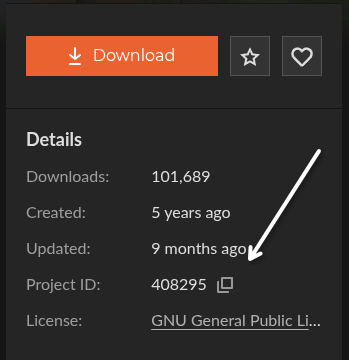
Version Resolution
CurseForge supports standard version aliases, but specific versions must be numeric File IDs.
| Alias | Resolution |
|---|---|
@latest or @stable | Resolves to the most recent Release version. |
@experimental or @beta | Resolves to the most recent file (Release, Beta, or Alpha). |
numeric ID (e.g. 408295) | Resolves to the exact file matching the File ID. |
Hint
You can find the specific File ID in the URL of a file's detail page or by hovering over the
name in the Files tab. 
The Force Flag (!)
The CurseForge provider defaults to assuming compatibility only with Bukkit-based servers (e.g. PAPER, FOLIA, SPIGOT, and BUKKIT). If you use it with a different server type (like Velocity), the orchestrator will raise an error.
Use the ! flag to bypass compatibility and platform checks:
PLUGINS: |
  curseforge:12345@latest!