
Hangar
Using the Hangar plugin provider
Hangar is the official plugin repository for the PaperMC ecosystem. It is the primary source for Paper, Velocity, and Waterfall plugins.
Usage
To use a plugin from Hangar, use the hangar: prefix followed by the project namespace (slug).
environment:
  PLUGINS: |
    hangar:ViaVersion@latest
    hangar:MiniMOTD@latest
Hint
Hangar uses a Namespace (slug) to identify projects. You can find it in the URL of the project
page. 
Platform Mapping
The orchestrator automatically maps your server TYPE to Hangar's platform identifiers:
PAPER,FOLIA->PAPERVELOCITY->VELOCITYWATERFALL->WATERFALL
Hint
The FOLIA type is mapped to PAPER because Hangar does not have a separate platform for Folia.
Internally it is checked if the plugin supports folia using the SUPPORTS_FOLIA tag.
Version Resolution
Hangar supports two main version aliases:
| Alias | Resolution |
|---|---|
@latest or @stable | Resolves to the most recent Release channel version. |
@experimental or @beta | Resolves to the most recent Beta, Alpha, or Snapshot version. |
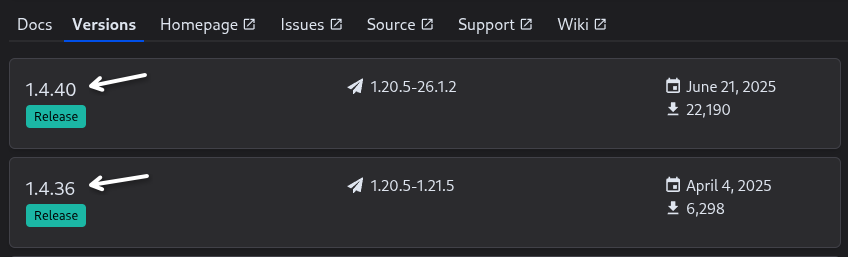
specific version (e.g. 5.2.1) | Resolves to the exact version name listed in the Versions tab. |
Hint
The version number can be found in the Versions tab or the sidebar of the project page.
The Force Flag (!)
Use the ! flag to bypass compatibility checks:
PLUGINS: |
  hangar:legacy-plugin@latest!
This will bypass:
- Platform loader compatibility checks
- Folia-specific support tags (
SUPPORTS_FOLIA) - Game version compatibility checks
Override Platform
You can manually specify a platform using the platform parameter in square brackets.
This is useful if you want to download a version for a specific platform, bypassing the automatic mapping.
PLUGINS: |
  hangar:ViaVersion[platform=paper]@latest
While Hangar categorizes plugins into Paper, Velocity, and Waterfall, many plugins designed for Paper also work on other platforms like Spigot.
This parameter allows you to force the download of a specific platform's file regardless of your server TYPE.