
Modrinth
Using the Modrinth plugin provider
Modrinth is a modern, fast, and open-source platform for Minecraft plugins and mods. It is the recommended provider for most users due to its clean API and rich metadata.
Usage
To use a plugin from Modrinth, use the modrinth: prefix followed by the project slug or ID.
environment:
  PLUGINS: |
    modrinth:luckperms@latest
    modrinth:geyser@latest
Hint
You can find the Project Slug in the URL of the plugin page, or the Project ID in the
options dropdown. Both work interchangeably. We recommend using the Project Slug as it is more
readable. 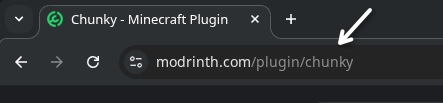 OR (not recommended)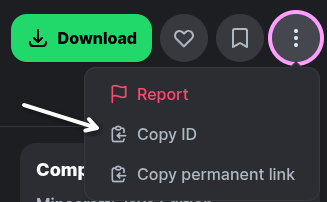
Smart Filtering
The orchestrator automatically filters Modrinth versions based on your server's configuration:
- Platform Loaders: It only requests files matching your
TYPE(e.g., if you run Paper, it filters for "paper" or "spigot" loader tags). - Game Version: It ensures the plugin version supports your
VERSION(e.g.,1.21).
Version Resolution
Modrinth supports two main version aliases:
| Alias | Resolution |
|---|---|
@latest or @stable | Resolves to the most recent Release version. |
@experimental or @beta | Resolves to the most recent Beta or Alpha version. |
specific version (e.g. 5.4.133, P3y2MXnd) | Resolves to the exact Version Number or Version ID listed in the Versions tab. |
Hint
To lock to a specific build, use the Version Number, which can both be found by clicking on a
specific version in the Versions tab. 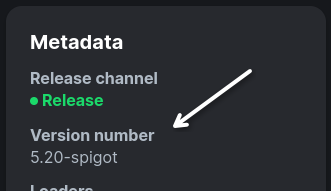
The Force Flag (!)
If you want to bypass the smart filtering (e.g., if a plugin isn't correctly tagged but you know it works), append a ! to the version:
PLUGINS: |
  modrinth:some-plugin@latest!
This will bypass:
- Platform loader compatibility checks
- Game version compatibility checks
Override Platform
You can manually specify a platform using the platform parameter in square brackets.
This is useful if a plugin is compatible with your platform but its Modrinth metadata is missing the correct tag (e.g., a plugin that works on Folia but only has the Paper tag).
PLUGINS: |
  modrinth:chunky[platform=spigot]@latest
When this parameter is used, it overrides the automatic platform detection based on your server TYPE.