
GitHub
Using the GitHub Releases plugin provider
The GitHub provider resolves plugins directly from GitHub Releases. It is ideal for projects that publish their plugin JARs as release assets on GitHub but are not listed on any of the other supported repositories.
Usage
Use the github: prefix followed by the repository's owner/repo slug.
environment:
  PLUGINS: |
    github:MilkBowl/Vault@latest
    github:EssentialsX/Essentials@experimental
Hint
The owner/repo slug is the last two path segments of any GitHub repository URL.
For example, https://github.com/MilkBowl/Vault -> MilkBowl/Vault.
Version Resolution
The GitHub provider supports the same version aliases used by every other provider.
| Alias | Resolution |
|---|---|
@latest or @stable | Resolves to the most recent non-pre-release release. |
@experimental or @beta | Resolves to the most recent pre-release. Falls back to latest stable if none exists. |
specific tag (e.g. 1.7.3) | Resolves to the release whose Git tag exactly matches the given string. |
Hint
Release tag names can be found on the Releases page of the repository. The tag label is shown
on the left side of each release entry. Use the exact string shown there as your version
specifier. 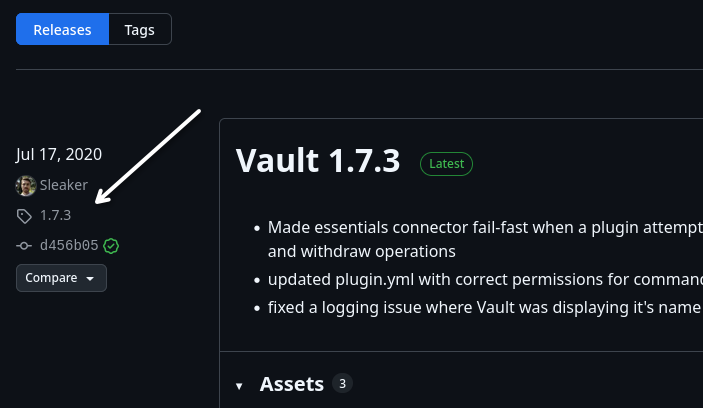
JAR Asset Selection
GitHub releases can contain multiple file assets. The orchestrator picks the correct JAR automatically:
- Filter to
.jarfiles — all other assets (source archives, zip files, etc.) are ignored. - Exactly one JAR -> that file is used directly.
- Multiple JARs -> the file whose name contains a loader keyword for your platform is selected (e.g. for Paper: looks for
paper,spigot, orbukkitin the filename). - Zero JARs, or the selection is still ambiguous -> an error is raised, with a hint to use the
regex=parameter.
The regex Parameter
When a release publishes multiple JARs that cannot be automatically disambiguated, you can pin the exact file using a regular expression:
PLUGINS: |
  github:plasmoapp/plasmo-voice[regex=plasmovoice-neoforge-1.21.7-.*.jar]@latest
Note
The pattern is matched against each asset name. Exactly one file must match — the orchestrator will error if zero or multiple files match, so you can refine the pattern accordingly.
Rate Limiting & Authentication
Important
The GitHub API allows only 60 unauthenticated requests per hour per IP address. Since the orchestrator checks releases on every container boot, you may hit this limit if you have many GitHub-sourced plugins or restart frequently.
The orchestrator makes exactly one request per plugin per boot. For example, if you have 10 GitHub-sourced plugins, the orchestrator will make 10 requests per boot. If you have 100 plugins, the orchestrator will make 100 requests per boot.
To increase the limit to 5 000 requests per hour, set the GITHUB_TOKEN environment variable
to a Personal Access Token
(a fine-grained token with read-only access to public repositories is sufficient):
environment:
  GITHUB_TOKEN: ghp_xxxxxxxxxxxxxxxxxxxx
  PLUGINS: |
    github:MilkBowl/Vault@latest