
SpigotMC
Using the Spiget plugin provider
SpigotMC is one of the oldest and largest plugin repositories. The orchestrator uses the Spiget API to resolve and download these plugins.
Usage
Because SpigotMC does not provide consistent project slugs via its API, you must use the resource ID. The resource ID is the number found at the end of a SpigotMC resource URL.
Example URL: https://www.spigotmc.org/resources/essentialsx.9089/ -> ID is 9089.
environment:
  PLUGINS: |
    spiget:essentialsx.9089@latest
Hint
The Resource ID is the number at the end of the URL. While only the number is required, you
can include the slug (e.g., essentialsx.9089) to make your configuration more readable. This
will be ignored by the orchestrator and can be anything you want. 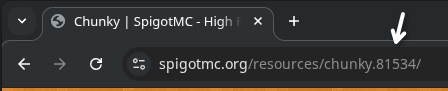
Version Resolution
SpigotMC resources typically only expose a single "primary" version through the Spiget proxy for simple queries.
| Alias | Resolution |
|---|---|
@latest or @stable | Resolves to the current stable version listed on SpigotMC. |
@experimental or @beta | (Same as @latest) |
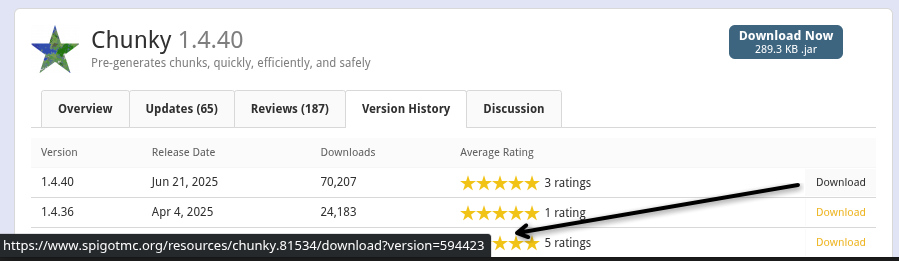
specific version ID (e.g. 594423) | Resolves to the exact internal version ID from SpigotMC. |
Hint
You can find the specific version string in the Version History tab of the resource page. You
need to copy the download url and extract the version from the version=... query parameter.
The Force Flag (!)
SpigotMC plugins often lack detailed metadata about platform compatibility. The orchestrator defaults to assuming compatibility with PAPER, FOLIA, SPIGOT, and BUKKIT.
Use the ! flag to bypass checks:
PLUGINS: |
  spiget:12345@latest!
This will bypass:
- Platform compatibility checks (Spiget generally only supports Spigot and Forks, so anything else needs to be forced)
- "Tested Versions" metadata checks